See it in the product
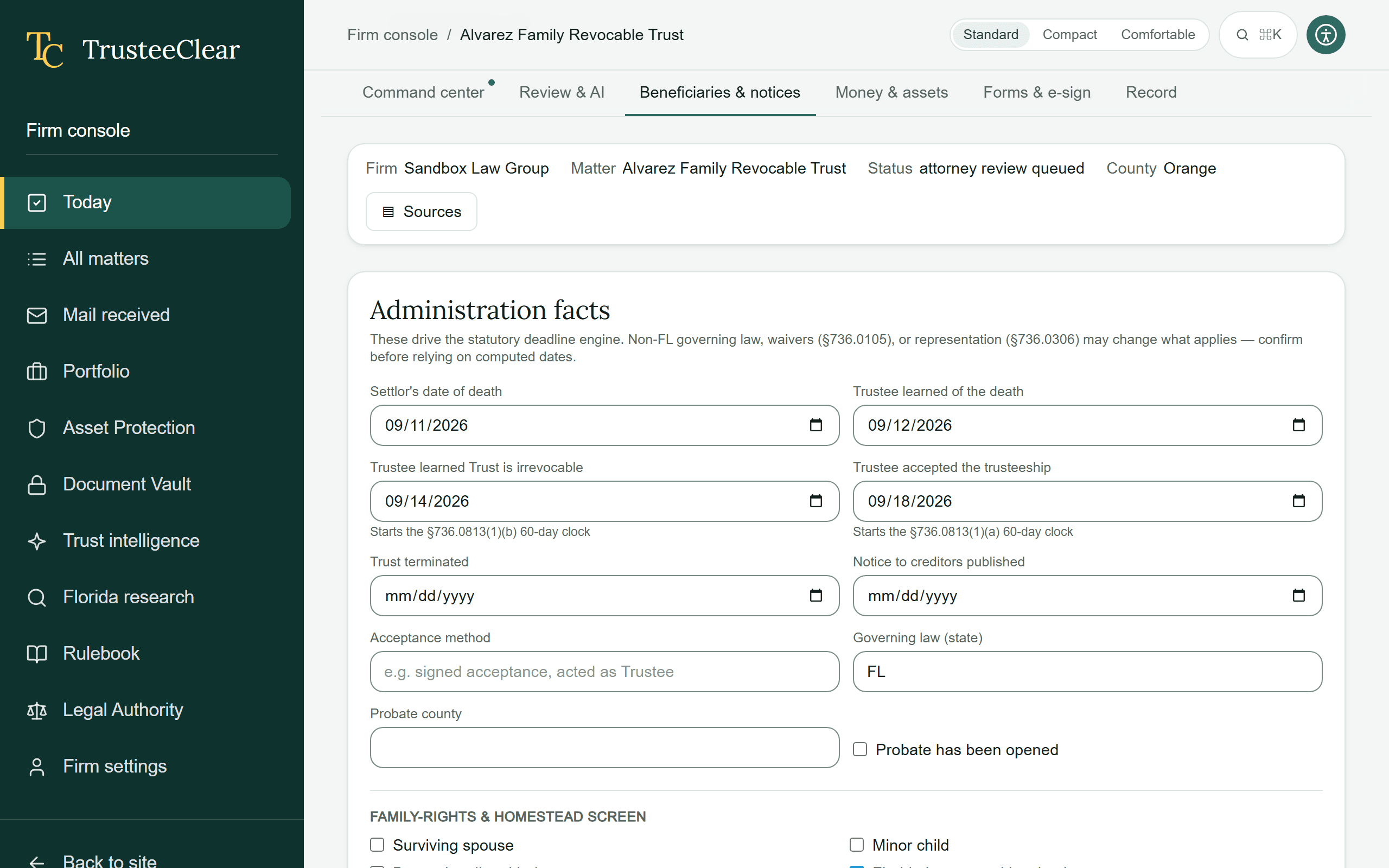
Read this chapter of how it works
Guide: Notice of Trust (Florida)
The role check
Available: website and law firms- What it does
- Asks a few questions and shows what a Florida role involves, with the statutes behind each point, before anyone pays.
- What it refuses
- No review of your trust and no advice about what it lacks. The desk can show a difference between two of your own records and the statute it relates to. It never says whether a trust is valid or complete, and never tells you what to fix. (Consumer-lane rule I3)
- Legal advice comes from a lawyer you choose. Where a step has legal consequences, the desk names the statute and suggests a licensed Florida attorney of your choosing. (Claims register: consult-counsel notices)
- Limits
- Florida trusts only.
- It describes the role; it does not assess a situation.
- Who may use it
- Anyone; saving a result needs an account.
- Inputs and outputs
- In: Answers to the questions.Out: A description of the role with its statutes.
- Availability
- Available to website trustees and law-firm tenants.
- AI use
- No model
- Access
- Public; Signed-in account, limited to its own records
- Evidence
- 3 automated suites run on every change.
The deadline engine
Available: website and law firms- What it does
- Computes statutory deadlines from the dates on the record, records how each date was calculated, and keeps mandatory duties on the list; a recalculation changes a suggested date and proposes a change to a confirmed one; a firm may record an exception only with a reason and a citation.
- What it refuses
- Your decisions stay yours. No one at TrusteeClear approves, files or sends anything for you. You send your notices and record what you did. (Consumer-lane rule I5)
- Limits
- A deadline is only as right as the date it is computed from.
- A mandatory duty cannot be switched off silently.
- A confirmed date moves only when the person who confirms the matter's dates confirms the change.
- Who may use it
- Everyone on the matter sees deadlines; the firm's staff record exceptions.
- Inputs and outputs
- In: The matter's dates and facts.Out: Deadlines and duty flags.
- Availability
- Available to website trustees and law-firm tenants.
- AI use
- No model
- Access
- Scheduled job; Signed-in account, limited to its own records; Firm staff on matters they are staffed on
- Evidence
- 5 automated suites run on every change.
Statutory notices
Available: website and law firms- What it does
- Fills a notice's factual blanks from the record for a person to edit and send, and records the delivery and any limitation clock it starts.
- What it refuses
- Nothing is filed or sent on anyone's behalf. Forms and notices fill their factual blanks from the record; a person edits, sends or files them and records the delivery. The software prepares nothing for anyone and files nothing. (Claims register: self-help forms and notices)
- No model writes a word or a number into a court form, notice or accounting. Court forms, statutory notices, packets and fee disclosures are assembled from deterministic templates, and accounting totals are computed from ledger rows. (Generative boundary: level L2)
- Limits
- On the website, the trustee completes and sends; on a firm's matter, the firm's attorney approves the exact words through the exact-artifact gate, and changed words go back to draft.
- Who may use it
- The trustee; the firm's staff on its matters.
- Inputs and outputs
- In: The record's facts.Out: A notice to send and its delivery record.
- Availability
- Available to website trustees and law-firm tenants.
- AI use
- No model
- Access
- Firm staff on matters they are staffed on
- Evidence
- 5 automated suites run on every change.
The duties packet
Available: website and law firms- What it does
- Organizes the Florida Trust Code duties with the statute text, the trustee's dates, beneficiaries, assets and tasks into one packet.
- What it refuses
- No lawyer reviews your documents on this website. Legal review exists only when a law firm provides TrusteeClear to its own client. On the website, the organizers and forms carry no review or approval by anyone. (Consumer-lane rule I1)
- No review of your trust and no advice about what it lacks. The desk can show a difference between two of your own records and the statute it relates to. It never says whether a trust is valid or complete, and never tells you what to fix. (Consumer-lane rule I3)
- Limits
- An organizer built from the trustee's confirmed facts; unattested statute summaries are flagged.
- Who may use it
- The trustee of the matter.
- Inputs and outputs
- In: The trustee's confirmed facts and the statute library.Out: A printable duties packet.
- Availability
- Available to website trustees and law-firm tenants.
- AI use
- No model
- Access
- Signed-in account, limited to its own records
- Evidence
- 2 automated suites run on every change.
Court-form drafts
Available: law-firm tenants- What it does
- Generates a draft court form from the matter's data; the firm saves its exact words as a version, and the matter's attorney approves that version through the exact-artifact gate, with its receipt.
- What it refuses
- Nothing is filed or sent on anyone's behalf. Forms and notices fill their factual blanks from the record; a person edits, sends or files them and records the delivery. The software prepares nothing for anyone and files nothing. (Claims register: self-help forms and notices)
- No model writes a word or a number into a court form, notice or accounting. Court forms, statutory notices, packets and fee disclosures are assembled from deterministic templates, and accounting totals are computed from ledger rows. (Generative boundary: level L2)
- Limits
- Drafts only; the firm files.
- A draft with an auto-filled value awaiting confirmation is not saved for review.
- Changed words are a new version; an earlier approval never carries over.
- Who may use it
- The firm's staff save; the matter's attorney approves.
- Inputs and outputs
- In: The matter's data.Out: A printable draft form; An approved version and its Trust Receipt.
- Availability
- Available to law-firm tenants.
- AI use
- No model
- Access
- Firm staff on matters they are staffed on
- Evidence
- 4 automated suites run on every change.
Calendar sync
Not enabled on this deployment- What it does
- Writes the matter's deadlines into a connected calendar account when staff sync it, one event per task, and takes off the events of held dates and completed tasks.
- What it refuses
- None recorded
- Limits
- One way and on request: a change made in the calendar is not read back, and nothing is written on a schedule.
- Outlook has no tentative state: a suggested date shows as tentative availability, with “(suggested date)” in its title.
- A connection can be disconnected at any time.
- Who may use it
- Signed-in people with access to the matter.
- Inputs and outputs
- In: A calendar connection.Out: Calendar events for deadlines.
- Availability
- Requires a calendar provider connection configured for this deployment, which this deployment does not carry.
- AI use
- No model
- Access
- Signed-in account, limited to its own records; Firm staff on matters they are staffed on
- Evidence
- 1 automated suite runs on every change.
This build
- Source commit
9059b600f01c86475fd9b98709e44bb7edfd5d24- Built
- Release run
- 46304511063 (attempt 1)
- Required checks
- CI (verify, end-to-end, Lighthouse gate): run 46300114997 (attempt 1)
- Row-level security matrix: run 46300115006 (attempt 1)
- Security scan (secrets, static analysis, dependencies): run 46300114995 (attempt 1)
Availability and counts on this page were computed when this build ran, from its own configuration and the records committed at its source commit.